
Designing a 0→1 product helping enterprise teams plan and ship launches that achieved 30% adoption within the first 60 days of general availability
ProductPlan helps product teams build roadmaps and ship products. But as our customers grew, we kept hearing the same pain point: "Our roadmap looks great, but when it comes time to actually launch, it's a complete nightmare."
Launch dates would slip. Marketing wouldn't know what was shipping. Cross-functional teams worked in silos. And PMs spent hours manually building reports in spreadsheets to answer one question: "Are we ready to launch?"
What if we could extend ProductPlan beyond roadmaps to help teams actually execute their go-to-market plans?
ProductPlan customers loved our roadmapping tools, but roadmaps are just the first step. As features moved from "planned" to "ready to ship," teams hit a wall. They couldn't track launch readiness, coordinate across functions, or communicate status without jumping into spreadsheets, Asana, or email threads.
This wasn't just a user problem. As ProductPlan grew, our own launches were becoming more complex. We needed this internally as much as our customers did. This gave us a unique opportunity to test our own solution on ourselves and validate it before a broader release.
I led end-to-end UX for this 0→1 product, from discovery through general availability. This meant wearing multiple hats:
Competitive analysis, customer interviews, survey design, usability testing, synthesis
Defining requirements, scoping MVP vs future phases, influencing roadmap priorities
Wireframing, prototyping, visual design, design system integration, and ongoing iteration based on feedback
I advocated for a phased rollout strategy that would let us learn and iterate:
Every launch involves 5-10 teams (engineering, design, marketing, legal, support, etc.), but there's no single source of truth. Teams use different tools, duplicate data, and constantly ask "Are we ready to ship?"
PMs spend 3-5 hours per week building status reports. They export roadmap data from ProductPlan, paste it into spreadsheets, manually update statuses, and share it via email or Slack. It's tedious, error-prone, and out of date the moment it's sent.
Some teams have detailed checklists. Others wing it. Some launches are tier 1 (major releases requiring legal sign-off), others are tier 4 (bug fixes that fewer people need to know about), but most tools treat all launches the same.
When we showed early wireframes, customers didn't care about fancy UI. They cared about: Can I see what's blocking my launch? Can I group related features into one release? Can I filter by launch date or readiness?

Product launch flow of information
"It's a nightmare. There's no standard process for go-to-market. It's confusing for everyone."
Based on research, I worked with the PM to define what we'd build first. We couldn't solve everything at once, so we focused on the highest-impact problems:
To guide decisions, I established three design principles:

Planning Alpha, Beta, and GA feature releases with stakeholders
I created low-fidelity wireframes exploring two core views:
I tested these with 8 customers in 45-minute sessions. Here's what I learned:
Many customers expected a calendar view (like Google Calendar), but research showed they cared more about readiness status than dates. A table let them scan, filter, and sort more effectively. We could add a calendar view later if needed.
Some teams wanted detailed checklists. Others just needed a launch date and a status. Rather than forcing one approach, I designed the checklist as an expandable detail view that teams could use (or ignore).
Ideally, launch status would update automatically based on task completion. But that required complex logic and integrations. For Alpha, I prioritized a simple manual status selector (On Track, At Risk, Launched). We could layer in automation once the core workflow was validated.

Sketches from design workshop

Early Figma mockups
Goal: Validate core functionality with our own team before releasing to customers
Goal: Expand to 15 customers and validate checklist functionality
Goal: Polish the experience and launch to all ProductPlan customers

Internal alpha mockup
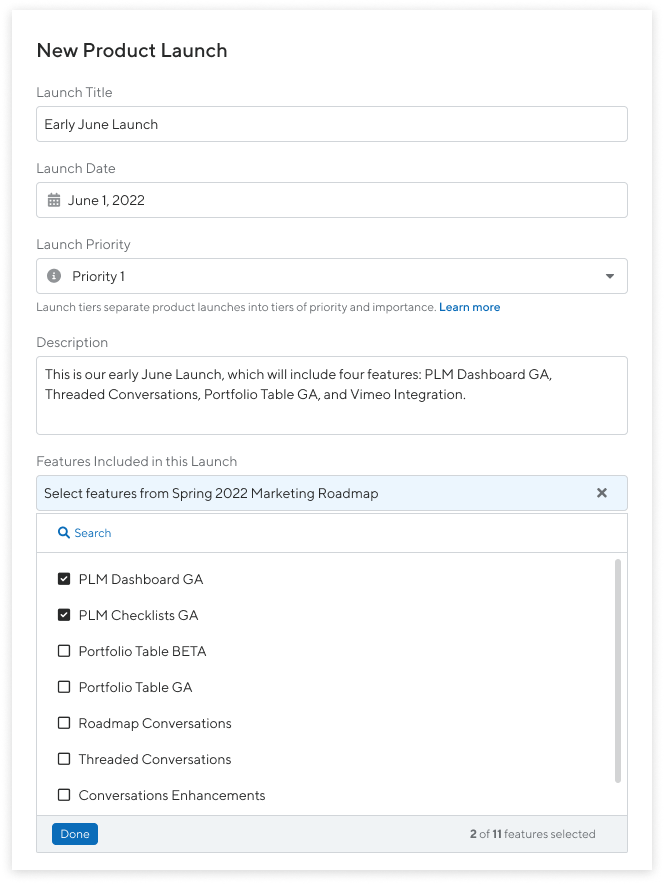
External Beta improvements to the launch creation flow
Launch Management gives product teams a centralized place to plan, track, and communicate upcoming launches. Here's what made it into the final product:
A scannable overview of all launches with key metadata: launch date, status (On Track, At Risk, Launched), owner, and priority. Users can filter by date, status, or owner to focus on what matters.
A deep-dive into a single launch showing all related features, a customizable checklist (with tasks grouped into sections), and the ability to assign tasks to team members. As tasks are completed, the overall launch status updates automatically.
Pre-built templates for different launch tiers (e.g., "Tier 1: Major Release" includes legal review, marketing plan, and support docs). Teams can use templates as-is or customize them.
Features can be added to a launch directly from the roadmap view. This creates a seamless flow from planning (roadmap) to execution (launch management).
Stakeholders can subscribe to launch updates and receive email notifications when statuses change or tasks are completed.
A few design decisions that made a difference:

Launch dashboard view

Launch detail view with checklists
Adoption within 2 months among Enterprise customers—exceeding our goal
Increase in Enterprise vs Professional plan conversions
Hours saved per week by eliminating manual spreadsheet updates
Customer feedback confirmed we'd solved real pain points:
"This has completely changed how we manage launches. We used to spend hours in spreadsheets and now everything we need is all in one place."
"The checklist templates saved us so much time. We don't have to rebuild launch plans from scratch anymore."
Using Launch Management internally before releasing it to customers helped us catch issues early and validate that the core workflow actually worked. It also made enablement easier because our team could speak from experience when onboarding customers.
We shipped a minimal version quickly (Alpha) and layered in complexity based on feedback. If we'd tried to build everything upfront, we would've spent 6 months building features no one needed.
Every team launches differently. By making checklists optional and allowing customization, we supported a wide range of workflows without forcing one "right way."
Launch Management is now a core part of ProductPlan's offering, but there's more to build: